Physicly
Best Progress Photo Apps for iPhone in 2026: 6 Compared
Six progress photo apps for iPhone compared on what decides the choice: how they line photos up, where your photos are stored and what they read from them.
Quick answer
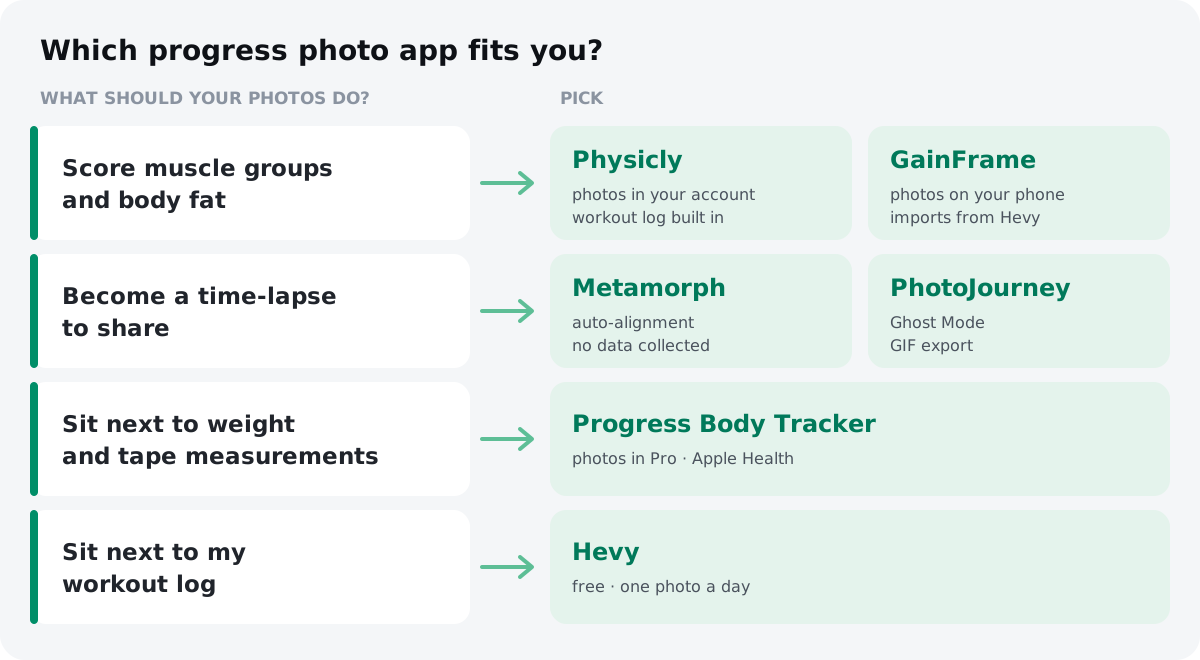
The best progress photo app depends on what you want the photos to do. For muscle-group scores and body fat estimates, pick Physicly or GainFrame. For aligned time-lapses kept on your phone, pick Metamorph or PhotoJourney. For photos next to tape measurements, Progress Body Tracker; next to a workout log, Hevy.
Key takeaways
- Three features decide most of the choice of a progress photo app: how it lines photos up, where it stores them and what it reads from them.
- A ghost overlay or automatic alignment makes progress photos comparable; without either, you rely on repeating the same spot, light and pose yourself.
- Metamorph, PhotoJourney and Progress Body Tracker keep photos on your phone or in your own iCloud, while apps that score photos with AI send them off the phone for analysis.
- Muscle scores and body fat estimates from a photo are visual estimates for tracking change over weeks, not a DXA scan.
- Test a progress photo app for a few mornings with the same setup before moving your whole photo history into it.
You take a progress photo, then another a month later, and the two don't line up: different light, a step closer, arms in a new spot. A progress photo app is supposed to fix that, and some of them also read the photo for you. They differ a lot in how they line photos up, where they keep them and what they do with them. This comparison of six iPhone apps sorts them by those three things so you can pick one before your photo history piles up in the wrong place.
What are the best progress photo apps for iPhone?
The best app is the one that matches what you want from your photos. Here are six that cover the main needs, with what each is best for and what you get without paying (checked on the US App Store on 2026-11-05). Prices are compared in their own section below.
| App | Best for | Free without a subscription |
|---|---|---|
| Physicly | Scores for 12 muscle groups plus a workout log in one app | Daily check-ins with the Ghost overlay, Compare, Trends, the workout log and one baseline X-Ray |
| GainFrame | AI physique and body fat estimates, photos kept on the phone | A free version; full AI features need Pro |
| Metamorph | Aligned time-lapses with no data collected | Free download; Pro adds more |
| PhotoJourney | Ghost-mode time-lapses and GIFs to share | Limited journeys, photos and export; unlimited needs Pro |
| Progress Body Tracker | Photos next to weight and tape measurements | Weight and measurement graphs; progress photos need Pro |
| Hevy | Private photos inside a free workout log | Workout log and progress photos |
How did we compare these apps?
We read each app's US App Store listing on 2026-11-05 (description, in-app purchases, privacy labels, system requirements) and the developer's own help pages where the listing was unclear. We did not test the five other apps hands-on, so every feature below is what the developer says the app does, not a result we measured.
One disclosure up front: we make Physicly, one of the six apps. To keep that fair, each section says where another app is the better choice, and we left out star ratings, because apps that launched years apart can't be compared fairly on them.
Which features matter most in a progress photo app?
Three things decide most of the choice: how the app lines photos up, where it keeps them and what it reads from them. Export, reminders and price matter less once those three fit.
| App | How it lines photos up | What it reads from a photo | Where the photos live | Workout log |
|---|---|---|---|---|
| Physicly | Ghost overlay of your last photo; pose and light checked on the phone before upload | 12 muscle-group scores, a physique score, a body fat estimate | Your Physicly account, on its servers | Built in |
| GainFrame | Guided pose templates and photo alignment | A physique score, 12 muscle groups (front and back), body fat estimates | On your phone; the listing says photos sent for analysis are not stored on its servers | Imports from Hevy, Strava and Apple Health |
| Metamorph | Automatic alignment, overlays and an alignment grid | No analysis listed | On your phone or in your iCloud | No |
| PhotoJourney | Ghost Mode, grid and body templates | No analysis listed | On your phone and your iCloud (per the developer's replies to reviews) | No |
| Progress Body Tracker | None described | None; it graphs the weight and measurements you enter | Inside the app on your phone, included in iCloud backups | No |
| Hevy | None described | None | In your Hevy account, private to you | Built in (it is a workout log) |
Alignment matters most, because most of the difference between two photos is usually the setup, not your body. A ghost overlay shows your previous photo faintly over the camera so you can match position and pose before you shoot. Automatic alignment shifts and scales photos after you take them so a time-lapse doesn't jump. Either beats nothing.
Storage is a real trade-off, not a detail. An app that keeps photos only on your phone, or in your own iCloud, never puts body photos on a company's server. An app that analyzes photos with AI has to send them somewhere to do it, and some also keep them in your account so you can see your history on any phone after a reinstall.
Reading the photo is what separates a photo album from a tracker. Without it, you compare by eye. With it, you get numbers per check-in, which helps when change is slow. If you're not sure what to look for in your photos at all, start with how to track muscle growth with lifts, tape and photos.
Which app reads each muscle group from your photos?
Physicly and GainFrame both estimate a physique score, scores for 12 muscle groups and body fat from your progress photos. They differ in where the photos go and what else lives in the app.
Physicly is built around one check-in photo a day. The Ghost overlay lays your last photo over the camera, and the phone checks pose and light before anything uploads. Each check-in gets an AI X-Ray that scores 12 muscle groups from 0 to 100, plus a physique score and a body fat estimate, and Compare shows any two days side by side. The workout log is part of the same app: each exercise card shows your lift history next to the X-Ray trend of the muscle it mainly works, so you can see whether a lift going up is matched by visible change. Check-ins, the Ghost overlay, Compare, Trends and the workout log are free. Ghost Pass adds the X-Ray on every check-in, the AI Coach and AI Predict, a six-month projection of your own body.
The trade-off to know: your photos are stored in your Physicly account, so your history follows you to a new phone, and they are analyzed by third-party AI providers (the privacy policy names them and says photos are not used to train AI models). You can delete any check-in, or the whole account, in the app. It is iPhone only.
GainFrame offers similar AI analysis with a different privacy model: its listing says progress photos are stored on your device, you can start without an account, and photos sent for analysis are not stored on its servers. It also imports existing photos in bulk, runs on iPad, has an AI coach and "Future You" projections, and connects to Hevy, Strava and Apple Health instead of having its own workout log. If keeping photos out of any cloud account matters most to you, GainFrame fits better; if you want your lifts and your photos read together in one app, Physicly does.
Which apps line photos up for a time-lapse?
Metamorph and PhotoJourney are the strongest picks if your goal is a clean before-and-after or a time-lapse video, and neither sends your photos to a company server, according to their developers.
Metamorph aligns photos automatically and adds overlays and an alignment grid. It exports time-lapses, before-and-after videos and GIFs. Its developer says photos stay on your device or in your iCloud and that they "don't store, or even have access to" them, and the App Store privacy label says the app collects no data. It needs iOS 18 or later.
PhotoJourney leans on capture: Ghost Mode lines you up with your previous photo, with a thirds grid and body templates as extra guides. It adds streaks, reminders and notes on photos, and exports HD time-lapses and GIFs. Unlimited journeys, unlimited photos and HD export need the Pro subscription.
Neither reads your photos. You get a smooth sequence, and the judging is still up to you.
Which app keeps photos next to your measurements?
Progress Body Tracker (by Lasmit) is the pick if your main tracking is the scale and the tape and you want photos alongside them. It graphs weight, body fat, BMI and body measurements, syncs with Apple Health, and stores photos inside the app rather than in your photo library. Progress photos are part of the paid Progress Pro upgrade, which is also sold as a one-time lifetime purchase. Its listing doesn't describe an overlay or alignment, so a consistent setup is on you.
Pairing photos with a tape is a good habit in any app: if your arm looks bigger but your waist grew too, part of that change is probably fat, not muscle.
Can your workout app handle progress photos?
If you already log workouts in Hevy, it may be enough. Hevy has a free tier, runs on iPhone and Android, and keeps progress photos in the Measures section of your profile. Its FAQ says progress photos stay private even when your profile is public, and you can place a photo side by side with another one.
The limits: Hevy's help center says "only one progress photo can be added per day," so front, side and back on the same morning won't fit, and it doesn't describe an overlay or alignment. It's a good free option for occasional photos, not for a daily, carefully aligned series.
How much do progress photo apps cost?
Compare like with like. Four of these apps store and line up photos; two, Physicly and GainFrame, also run AI analysis on them, which is a different product at a different price. Here are the paid plans from each US App Store listing on 2026-11-05.
| App | Yearly | Monthly | Other | What paying adds |
|---|---|---|---|---|
| Physicly (Ghost Pass) | $59.99 (about $5/month) | $9.99 | — | X-Ray on every check-in, AI Coach, AI Predict |
| GainFrame (Pro) | $39.99–$49.99 | $5.99–$7.99 | Weekly $3.99–$9.99 | Full AI analysis and coach explanations |
| Metamorph (Pro) | $29.99 | $4.99 | $129.99 lifetime | More export and editing tools |
| PhotoJourney (Pro) | Listed from $3.99 to $44.99 | Free trial | Unlimited journeys, photos, HD export | |
| Progress Body Tracker | From $3.99 | $29.99 lifetime | Progress photos | |
| Hevy (Pro) | $23.99 | $2.99 | $74.99 lifetime | Workout log extras (photos are free) |
Two things stand out. Physicly's free tier keeps the photo part of the app open, check-ins, Ghost overlay, Compare and the workout log, so you only pay for the AI. And among the two AI apps, a yearly plan is the cheapest way in for both; GainFrame's weekly plans add up to more per month than either app's monthly plan. Prices change often and some listings show several prices for one plan (intro offers, regional tiers), so check the listing before you subscribe.
Which progress photo app should you pick?
Pick by the one thing you want most. If two rows fit, choose the app whose trade-off bothers you less.
| If you want… | Pick | Trade-off |
|---|---|---|
| To see which muscles your training is growing, with the workout log in the same app | Physicly | Photos are stored in your account (synced, deletable); AI features need Ghost Pass |
| AI scores, with photos kept on your phone | GainFrame | No built-in workout log (it imports from Hevy or Strava); AI features need Pro |
| A time-lapse or before-and-after video to share | Metamorph or PhotoJourney | No analysis; you judge the change by eye |
| Photos next to your weight and tape numbers | Progress Body Tracker | Photos need Pro; no alignment described |
| Free photos inside the workout log you already use | Hevy | One photo per day; no overlay |
| Nothing new to install | An album in iPhone Photos | No overlay or side-by-side view; photos mix with your camera roll |
The iPhone's own Photos app can work if you're disciplined: make an album, turn on the camera grid, mark a spot on the floor and shoot at the same time of day. What you lose is the overlay that makes each photo match the last and a side-by-side view without screenshots.
How do you test a progress photo app before you commit?
Run a one-week trial with the same setup in every app you're considering, before you move your whole photo history into one of them. Three mornings in a row are enough to see whether the app helps you repeat the shot.
- Fix your setup first. Same spot, same light, phone at chest height, same distance. Mark the floor.
- Shoot a baseline of front, side and back on day 1, using the app's overlay or grid.
- Shoot again on days 2 and 3 under the same conditions.
- Compare day 1 with day 3. Your body didn't change in two days, so any difference you see is the setup. The app that makes the two photos look most alike is doing its job.
- Check the exit. Find how to export a photo and how to delete one. If either is hard to find, think twice before trusting the app with a year of photos.
If an app reads your photos, run its analysis on two photos from the same week too. Scores that jump around between near-identical photos are noise, and you'll want to read them as a trend over weeks, not day to day.
Can an app measure muscle or body fat from a photo?
No app measures muscle mass from a photo. What AI apps produce are visual estimates, useful for tracking the direction of change under the same conditions, not for a one-off reading.
Research shows photo-based estimates can be close to lab methods under controlled conditions. In a 2022 validation study, one smartphone-photo method estimated body fat with a mean absolute error of about 2.2 percentage points compared with DXA, lower than the consumer scales tested alongside it (Majmudar et al., 2022). That result belongs to that method and that study. It doesn't tell you how accurate any app in this list is, and the App Store listings of the two apps that score photos don't cite an independent validation of their scores.
So treat a score like you'd treat your photos: compare it with itself over weeks, taken in the same setup, and read it alongside your training log and a tape around your waist, the way the lifts, tape and photos method combines them. If you're tracking for a medical reason, ask a doctor rather than an app.
How to test a progress photo app before you commit
Fix your setup
Use the same spot, the same light, the phone at chest height and the same distance. Mark the floor where you stand.
Shoot a baseline
On day 1, take front, side and back photos in each app you are considering, using its overlay or grid.
Repeat on days 2 and 3
Take the same three photos under the same conditions on the next two mornings.
Compare day 1 with day 3
Your body did not change in two days, so any difference is the setup. Keep the app that makes the photos look most alike.
Check export and deletion
Find how to export a photo and how to delete one before you trust the app with months of photos.
Frequently asked questions
Are progress photo apps free?
Most are free to download, but the core photo features often sit behind a subscription. Hevy keeps progress photos in its free workout log, while Progress Body Tracker puts photos in its paid Pro upgrade. In Physicly, check-ins, Compare and the workout log are free; Ghost Pass adds the X-Ray on every check-in.
Do progress photo apps keep my photos private?
It depends on the app. Metamorph and PhotoJourney say photos stay on your phone or in your own iCloud, and Progress Body Tracker stores them inside the app. Apps that analyze photos with AI send them off the phone: GainFrame says it does not store them on its servers, and Physicly keeps them in your account so you can view your history.
Can I use the iPhone Photos app for progress photos?
Yes. Make a separate album, turn on the camera grid, mark a spot on the floor and shoot at the same time of day. You lose the ghost overlay that matches each photo to the last one and a built-in side-by-side view, and your progress photos sit next to the rest of your camera roll.
Is a ghost overlay better than automatic alignment?
They solve different parts of the problem. A ghost overlay helps you take a matching photo in the first place, by showing your last photo over the camera. Automatic alignment fixes small shifts afterward so a time-lapse does not jump. A good capture beats any correction, so an overlay matters most for daily check-ins.
How often should you take progress photos?
Taking a progress photo every morning costs a few seconds and gives you more good frames to choose from, but judge them only weeks apart. Day-to-day differences are mostly water, food, pump and setup. Compare photos at least four weeks apart, in the same pose and light, alongside your training log and tape measurements.
Sources
- Smartphone camera based assessment of adiposity: a validation study, npj Digital Medicine (2022)
- Physicly: AI Physique Photos (US App Store listing, checked 2026-11-05), Apple App Store
- GainFrame: Gym Progress Photos (App Store listing, checked 2026-11-05), Apple App Store
- Body Progress Pics: Metamorph (US App Store listing, checked 2026-11-05), Apple App Store
- Body Tracker - Photo Journey (US App Store listing, checked 2026-11-05), Apple App Store
- Progress Body Tracker: My BMI (US App Store listing, checked 2026-11-05), Apple App Store
- Hevy - Workout Tracker Gym Log (US App Store listing, checked 2026-11-05), Apple App Store
- How to Record Body Measurements and Progress Photos, Hevy Help Center
- How to Take and Upload Progress Photos, Hevy
About the author
Physicly Team · The team behind Physicly
We build Physicly, the iPhone app that turns one progress photo a day into an AI X-Ray of 12 muscle groups. We write about tracking physique change honestly: what photos can show, and what they cannot.